How to Build an AI System for Free — Using Nothing but Folders
The setup people pay $20,000–$200,000 for, built with nothing but folders — the whole blueprint, step by step.
Most "AI systems" sold to businesses are overbuilt on purpose.
A developer or agency builds you something on a framework — LangChain, CrewAI, AutoGen. Code that wires a bunch of AI agents together. A server. Dashboards. They charge you $20,000 to $200,000. And when it breaks, only they can fix it — because only they understand it.
For 95% of what a business actually needs, that isn't sophistication. It's a moat around your wallet.
Here's what none of them want you to know: you can build the same thing yourself. For free. In an afternoon. Using folders.
Not a metaphor. Actual folders, on your computer, with plain text files inside them.
This is the whole foundation, start to finish. It runs long because it's complete — the idea, the reason it works, the history it's borrowed from, and the exact files to copy. Read it twice. Build as you go.
The one idea
Folder structure is the architecture.
That's the whole secret. Instead of writing code to coordinate AI agents, you organize your instructions and context into a folder tree. The AI reads the right file at the right moment and does the work. The folders do the job the expensive framework was doing in code.
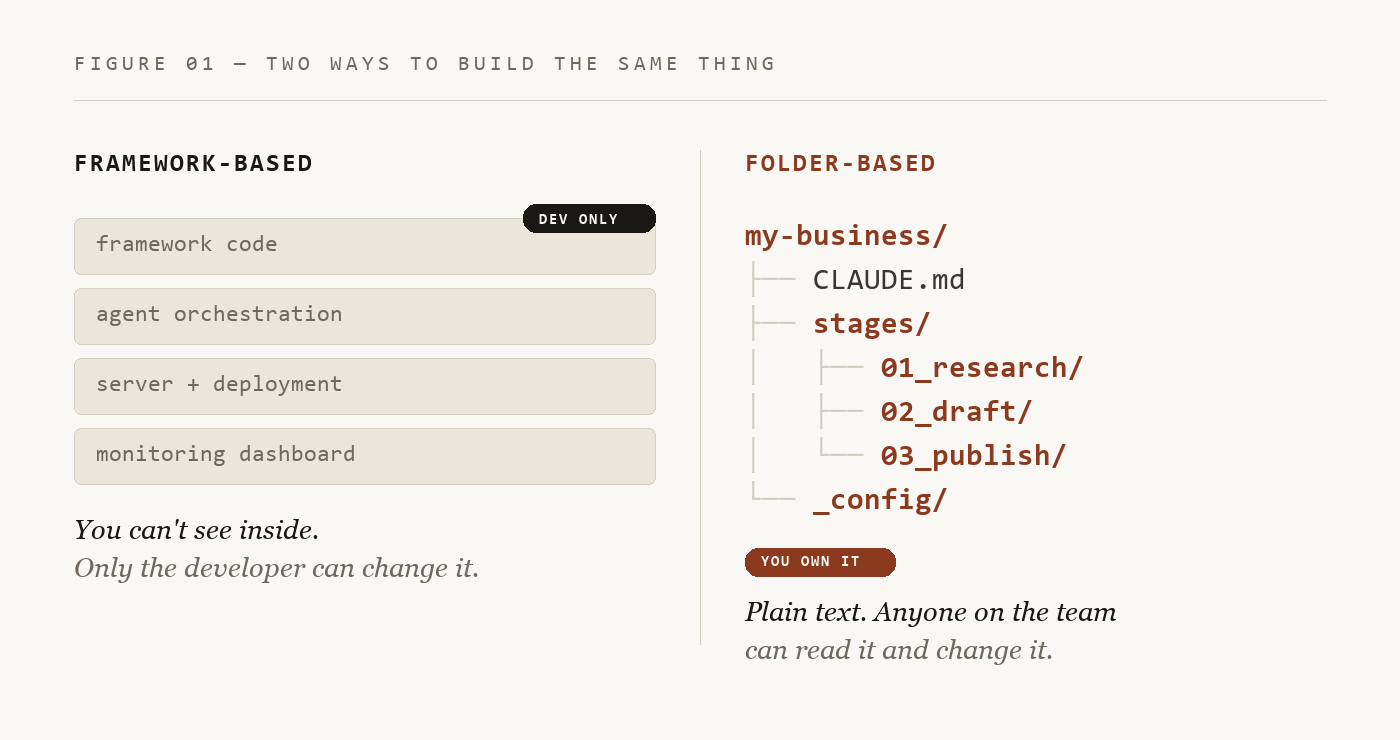
When you first hear it, it sounds like a downgrade. Folders are old. Text files are old. Surely a real AI system needs something more sophisticated. The simplicity is the point. Here's what a folder gets you that a $50,000 framework can't:
- You can read it. Every instruction is a plain text file. Open it. Read it. No black box.
- You can change it. Need a new step? Add a folder. Wrong tone? Edit a file. No developer. No deployment.
- You can move it. The whole system is one folder. Copy it, back it up, email it. No server.
- You can see inside it. Every step writes a file you can open and check. The files ARE the dashboard.
You lose nothing. You gain everything you were paying to not have.
Why most people get nothing out of AI
Most people open Claude or ChatGPT, type a question, get an answer, and start over. Next time, they re-explain who they are and what they're working on. They paste the same context again. They hit a limit and open a new chat from zero.
That's fine for quick questions. It falls apart the moment you try to do real, ongoing work. You burn the AI's attention re-explaining yourself. You can't edit what it produces at each step. Every session starts cold.
The folder structure fixes all of it. But to see why, you need to understand one thing first.
Tokens — the thing that decides everything
A token is roughly three-quarters of a word. Short words are one token. Long ones — "hamburger" — can be three. It's the smallest chunk of text an AI reads at a time.
The word is borrowed. Language researchers in the 1990s needed a unit smaller than "a word," because not every language breaks into words the same way. They took "token" from linguistics, which took it from old English — a token was a sign, a small thing that stands for something. That's exactly what it is here: the smallest meaningful piece of a sentence.
Here's why it matters. An AI can only hold so many tokens at once before it starts to slip. That ceiling is the context window — everything the AI is "thinking about" right now: your instructions, your files, the conversation so far. It's finite.
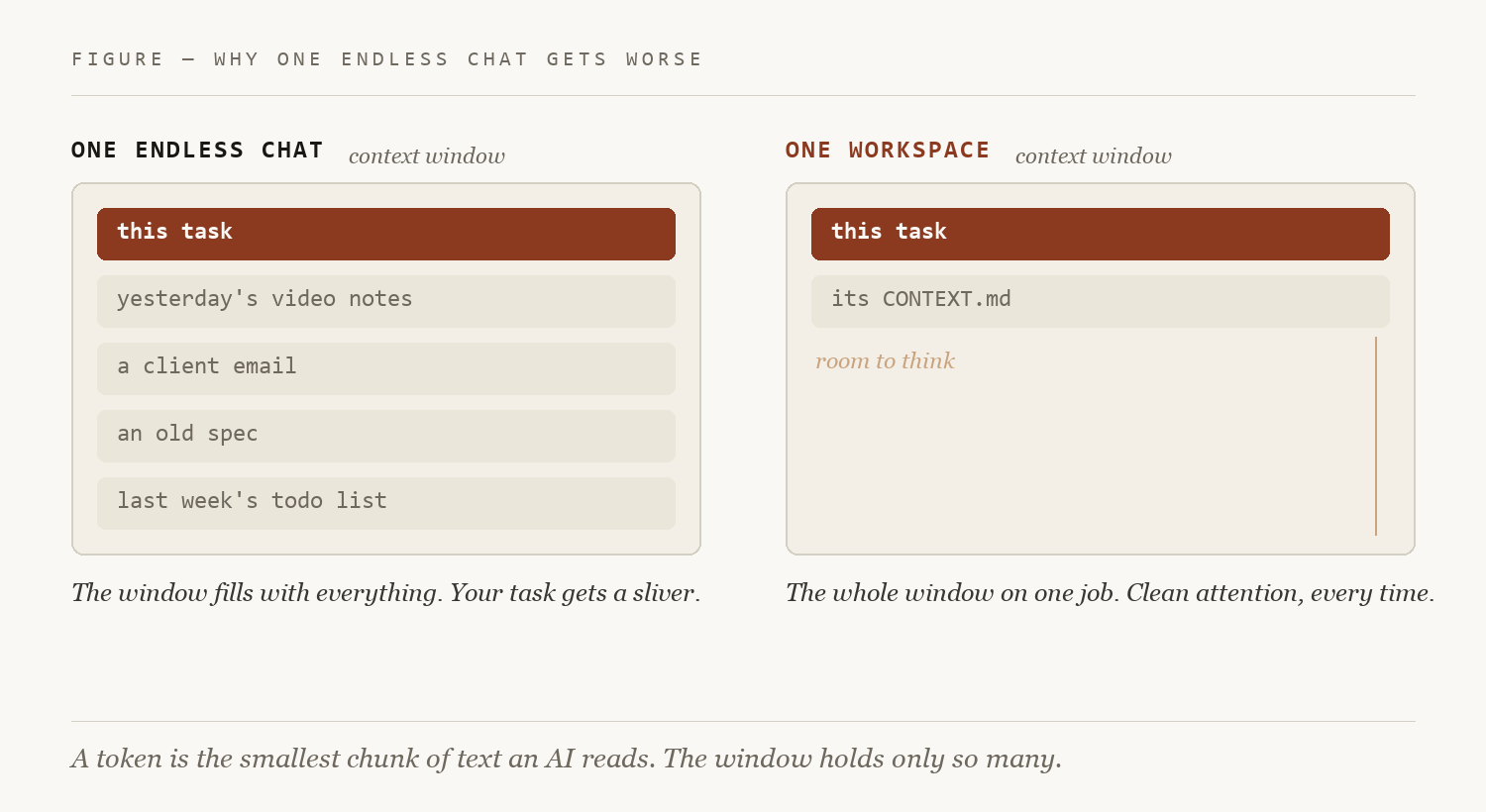
So if you dump everything into one endless conversation, the AI writing your blog post is also carrying your video production notes, last week's client email, and Tuesday's half-finished spec. It spends its limited attention on things that have nothing to do with the task — and quietly gets worse at the one you asked for.
The folder structure fixes this by separating your work into areas and loading only what the task in front of it needs. Clean attention, every time. That alone is most of the gap between people who get magic out of AI and people who get mush.
The three layers
This is the core of the whole system. Three layers, each with one job.
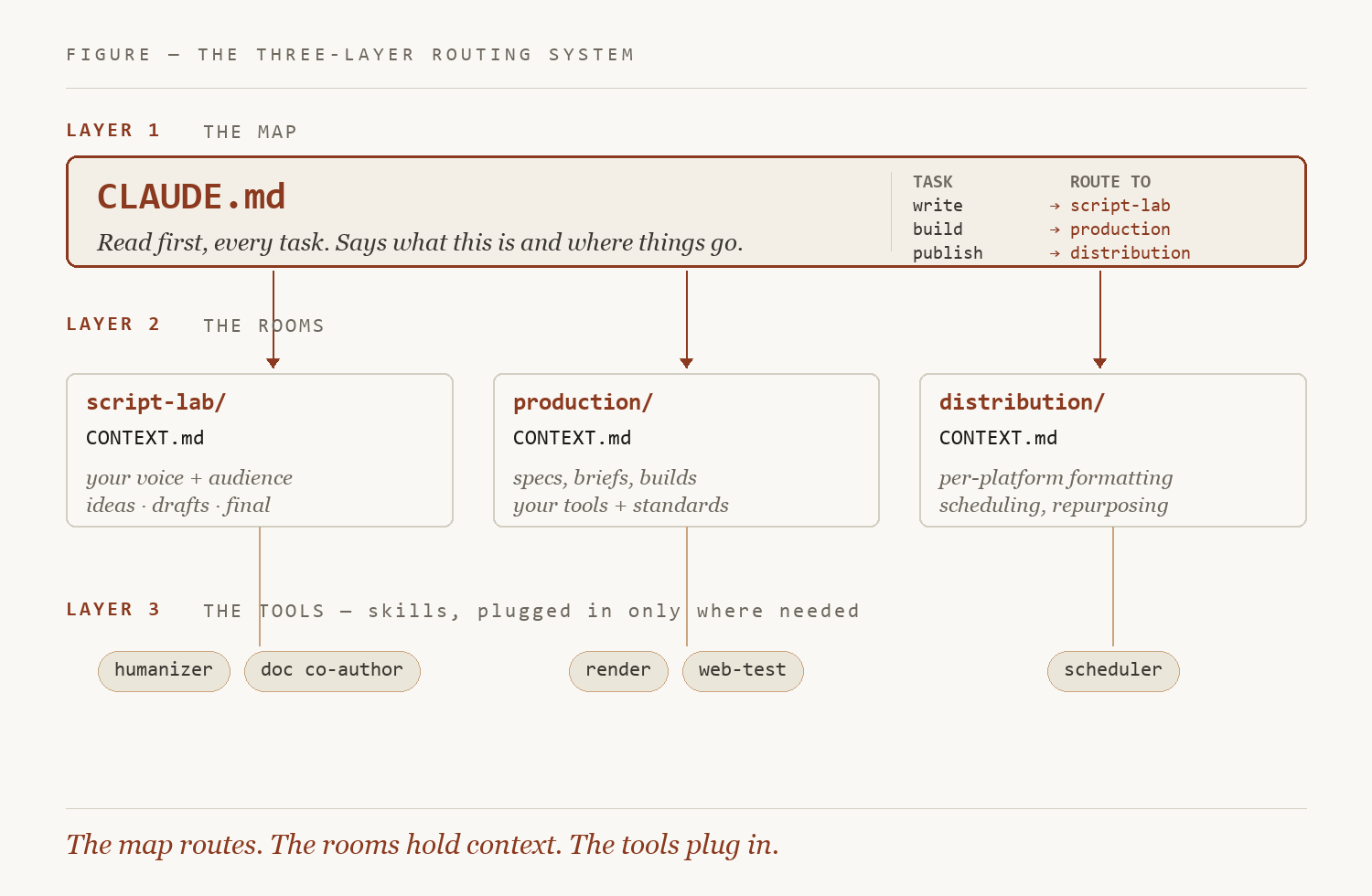
Layer 1 — the map (CLAUDE.md). One file at the top of your project. The AI reads it first, every time. Think of it as the floor plan by the door: what this project is, what the workspaces are, where things go, and a short routing table that says "for this kind of task, go here, read this." Without the map, the AI reads everything (wasting tokens) or guesses (getting it wrong). It's the single most important file in the system.
Layer 2 — the rooms (a CONTEXT.md in each workspace). Each area of your work gets its own folder and its own context file. Tell the AI to work in the writing room and it reads the writing room's context — your voice, your process, what good looks like there — and nothing from the other rooms. No bleed. You walk in; it already knows where it is.
Layer 3 — the tools (skills). Skills are packaged processes — make a slide deck, humanize a draft, review code — wired into the rooms that need them. You don't load every tool everywhere. The production room gets the build tools; the writing room gets the writing tools. Plug them in where they belong, leave them out where they don't.
Map routes. Rooms hold context. Tools plug in. That's the engine.
Why every file is plain text
Every file in this system is markdown — a plain text file with a few light symbols. Dashes make bullets. Hash signs make headers. Asterisks make bold. That's basically it.
A writer named John Gruber created markdown in 2004. The goal was simple: write something that reads fine as plain text but can also render into a clean document — the readability of a note, without the tags of HTML.
You're already using it without knowing. When Claude answers with headers and bold text, it's writing markdown underneath. Copy its reply into a plain text file and you'll see the little symbols. That's why we use it for everything: the AI reads and writes it natively, and you can open any file in any text editor on any computer made in the last forty years.
You don't need special software for any of this. Your normal file explorer and Notepad are enough. Tools like VS Code — or Claude's own folder mode — just make it tidier to move between a lot of files. Skip them until you want them.
Build one right now
Steal this exactly.
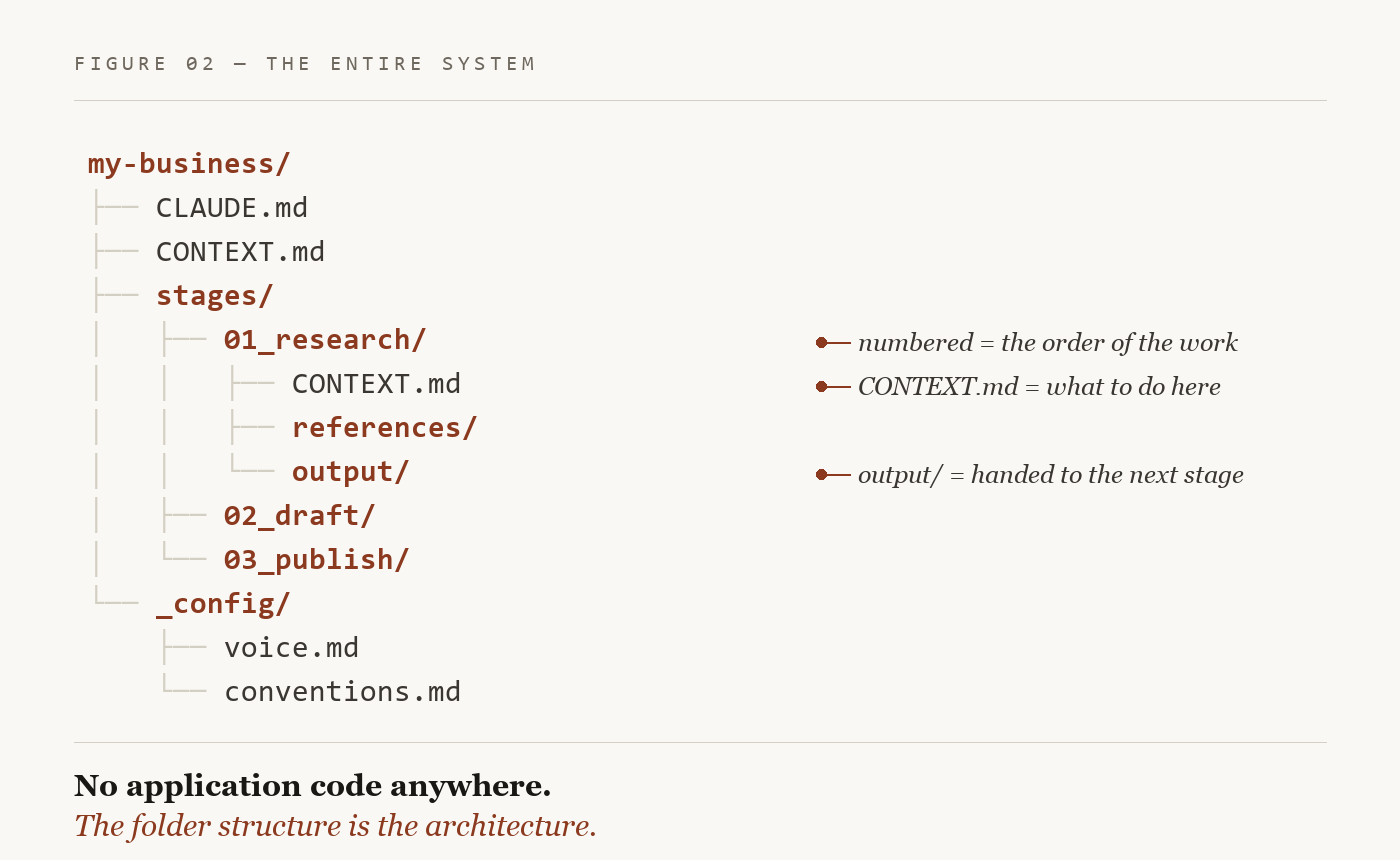
Step 1 — Make these folders and empty files:
my-workflow/
├── CLAUDE.md
├── stages/
│   └── 01_do-the-thing/
│       ├── CONTEXT.md
│       └── output/
└── _config/
    └── standards.md
Step 2 — Put this in CLAUDE.md. This is the map. It says what the thing is and routes every task:
# [Name it — e.g. "Weekly competitor brief"]
This workspace produces [the one thing it makes].
Run it one stage at a time, in numbered order.

## Routing — for each task, go here and read this
| Task        | Go to         | Read       |
| ----------- | ------------- | ---------- |
| Do the work | stages/01_... | CONTEXT.md |

## Rules
- Before working in a stage, read that stage's CONTEXT.md first.
- Write every result into that stage's output/ folder.
- Follow _config/standards.md for tone, format, and quality.
- Don't skip a stage — each stage's output feeds the next.
Step 3 — Put this in stages/01_do-the-thing/CONTEXT.md. This is one room — one job:
# Stage 01 — [what this step does]
GOAL: [the single outcome this step produces]
INPUT: [what to read — a URL, a file, a prompt you paste]
DO:
  1. [first action]
  2. [second action]
  3. [check it against _config/standards.md]
OUTPUT: write the result to ./output/ as [filename].md
Step 4 — Run it. Open the folder in any agentic AI tool — Claude Code, Cursor, whatever you use. Point it at CLAUDE.md. Tell it to run stage 01.
Done. That's a working AI system. Want a second step? Make a folder called 02_. Want to reorder the work? Renumber the folders. Want a different voice? Edit one text file.
You just built the thing they quote five figures for.
Naming conventions: a database without a database
One more piece that makes this work with zero code. In your CLAUDE.md, you set naming rules.
A blog draft becomes api-auth-guide_draft.md. A newsletter becomes 2026-03-launch-week.md. Version two of a demo script becomes demo_v2.md.
Now the names carry the information. You can say "pull my demo v2 and turn it into a spec" and the AI knows exactly what to find, where it lives, and what to do next. No database. No search index. No code. The filename is the lookup.
Make it yours: three real setups
The folder names above are placeholders. The layers never change — the labels do. Here are three real shapes. Find the one closest to your work, then build your own.
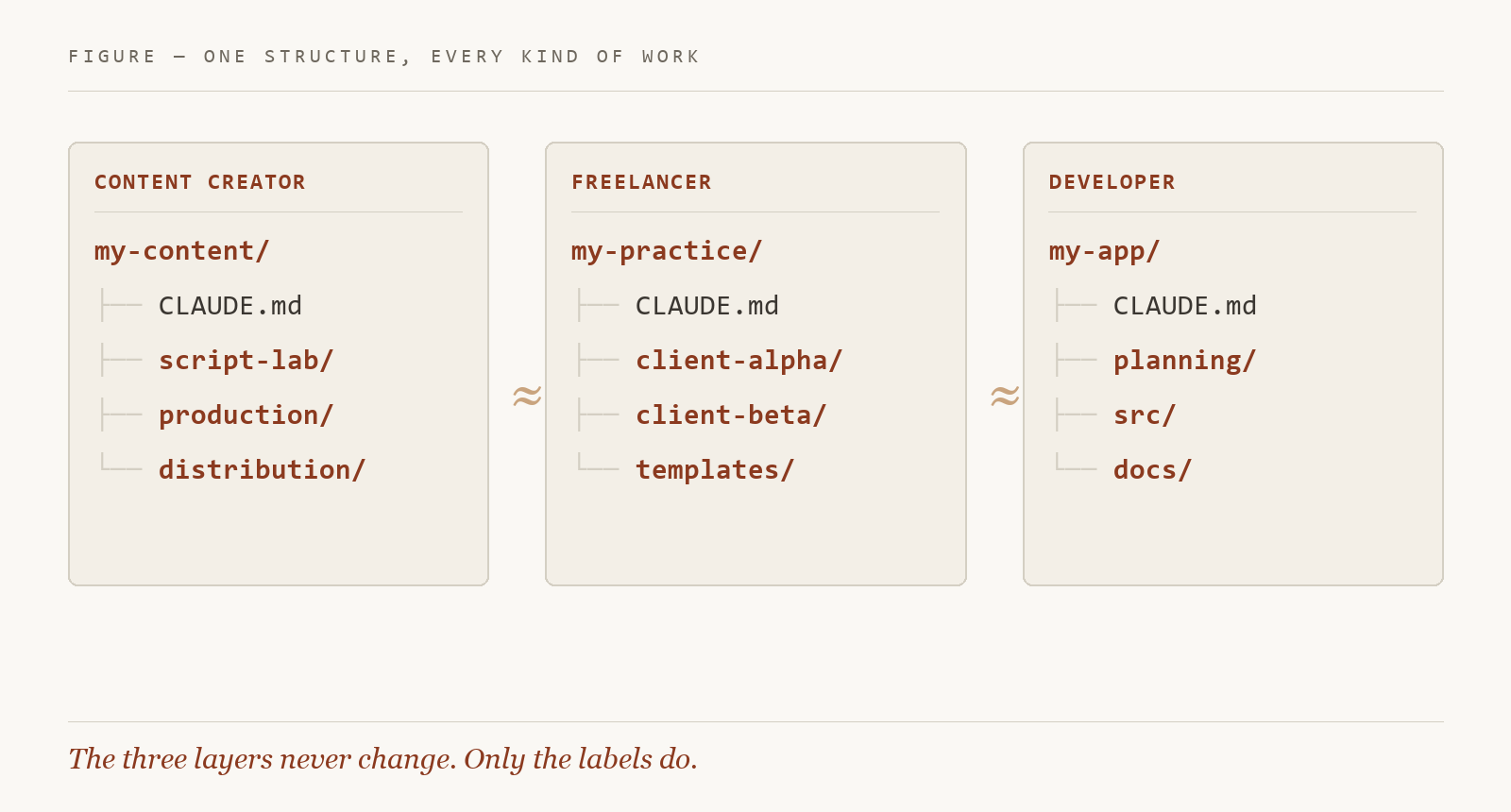
If you make content. Three rooms: a script lab (ideas to drafts to final), a production room (briefs, specs, builds), a distribution room (per-platform formatting, scheduling, repurposing). The script lab's context holds your voice and audience, so the AI writes like you from the first line.
If you're a freelancer or consultant. One room per client, each with its own context — who they are, the engagement, the phase, their terminology — plus a templates room and a business-dev room. Say "let's work on Alpha" and it reads Alpha's context and nothing from Beta. Land a new client? Copy the structure, write one new context file, add one line to the map.
If you build software. Rooms for planning, source, docs, and ops — each with a context file describing the stack, the conventions, the standards. This is where Layer 3 earns its keep: wire a testing skill into the source room, a doc skill into the docs room, so each loads only where it's relevant.
Same three layers every time. You change the labels and the context. The architecture holds.
Why this works: fifty years of one idea
This isn't new. It's the oldest principle in software, pointed at AI.
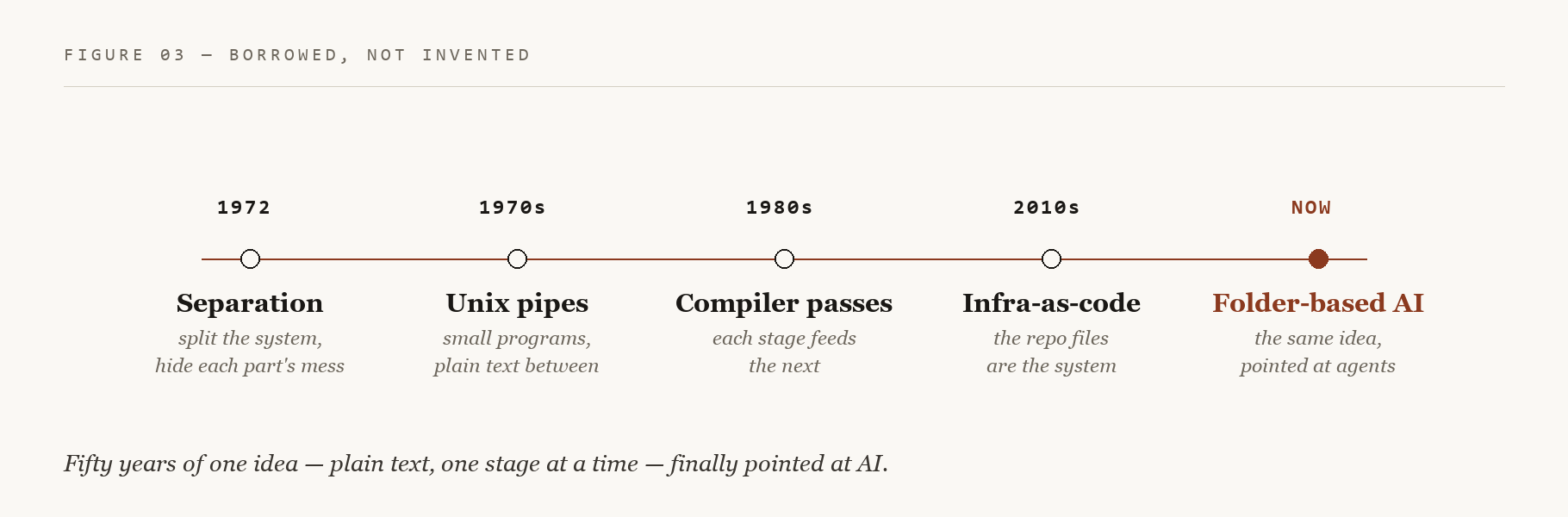
In 1972, a computer scientist named David Parnas wrote a short, famous paper arguing that systems should be split into parts that each hide their own complexity and connect through clean, simple interfaces. Separation of concerns. It became one of the load-bearing ideas of all software.
Everything good that followed is a version of it:
- Unix, 1970s — small programs that each do one thing, connected by plain text. Still running today.
- Compilers, 1980s — break a hard transformation into stages, each reading the last one's output.
- Infrastructure-as-code, 2010s — stop configuring servers by hand; put the whole system in plain files in a folder, and the files are the source of truth.
Each of those beat the smarter, more complicated alternative of its day. Folders-for-AI is the same bet: each room does one thing, the map routes between them, plain text is the interface. Simple things you can read and change beat complex things you can't. Fifty years of evidence say so.
The full lineage — 1972 through to AI — and the deeper five-layer version of this architecture are written up in a 2026 research paper I'll point you to at the end. Hand it to your AI and have it walk you through whatever part you want to go deeper on.
Now here's how you make money with it
Two ways.
Use it. Build the repetitive, boring work in your own business as folder workflows — content, outreach, reporting. You stop paying for tools, and you stop doing the same work twice.
Sell it. This is the part people are sleeping on. Businesses are being quoted $30,000 for systems they can't even operate. You can build them a folder workspace they own — readable, editable, no lock-in — and charge for it. They pay happily, because it's the opposite of everything else on the market. One folder. One handoff. Theirs forever.
The cost of building just fell to almost nothing. The people who win now aren't the ones with the fanciest stack. They're the ones who know what to point it at, and who can hand someone a thing that works — then walk away.
That's the whole game.
This is just the foundation
Everything above is the ground floor. It's enough to change how you work this week — but it's the beginning, not the whole building.
What you just learned is three layers. The full architecture has more: skills built and chained in depth, external tools and live data wired in, several workspaces orchestrated together, the five-layer version laid out in the research. It gets more capable — and yes, more complex.
Don't reach for that yet. Get this working first. Build one workspace. Run it until the three layers are second nature — until you can feel where a task belongs before you've finished reading it. When that clicks, you're ready for what's next.
Because this is the start of a series. I'm going to build this all the way up, one piece at a time, in plain language, exactly like this. If you can build the foundation in this post, you're ready for every layer that comes after it.
If this was useful, subscribe — I give the whole playbook away, one piece at a time. No upsell, ever. The next one goes deeper.
(Credit: the full history and the five-layer architecture are formalized in a 2026 paper by Van Clief & McDermott — arxiv.org/abs/2603.16021. I landed on the same shape building my own systems before I read it.)
Take this with you
The fastest possible start — three files, five minutes. Make a folder. Put these inside.
CLAUDE.md — who you are, what this is, where things go:
# Identity
You are helping [YOUR NAME] with [WHAT YOU DO].

# Folders
- /drafts      — work in progress
- /final       — finished outputs
- /references  — background material

# Rules
- Read this file first on every new task.
- Ask before creating files outside /drafts.
- When unsure, ask.
CONTEXT.md — the current project:
# Current project
[What you're building. 2–3 sentences.]

# What good looks like
[What a successful output looks like.]

# What to avoid
[Common mistakes or things you don't want.]
REFERENCES.md — background the AI should know but not act on:
# References
[Examples, links, style guides, notes — anything the AI
should have access to but doesn't need to act on directly.]
Point your AI at the folder — Claude Code, or upload the three files to a project, or paste them into your first message — and give it a task. You'll feel the difference on the first reply.
And if you'd rather learn it cold than just read it: copy this entire post, paste it into your AI, and say "Teach me this. Quiz me until I've got it, then walk me through building my first workspace." You'll own it by the end of the day.
New essays, sent to your inbox when they publish. No cadence, no filler.
Subscribe →